

Test Webhooks
Test your webhook integration locally before deploying to production.
Before deploying your webhook handler to production, you'll want to verify it works correctly. This guide covers two approaches: using webhook.site for quick testing, and ngrok for testing your actual code.
Option 1: Quick Test with webhook.site
webhook.site is a free tool that gives you a temporary URL to receive and inspect webhook payloads. It's perfect for understanding the event structure before writing any code.
Get a test URL
Go to webhook.site and copy your unique URL
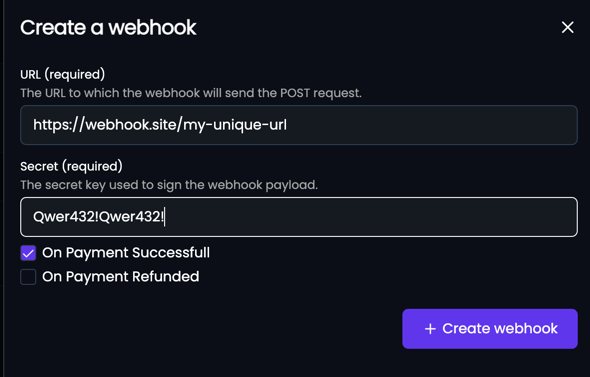
Send a test event
Open your webhook and click the Test button. Select an event type and click Send.
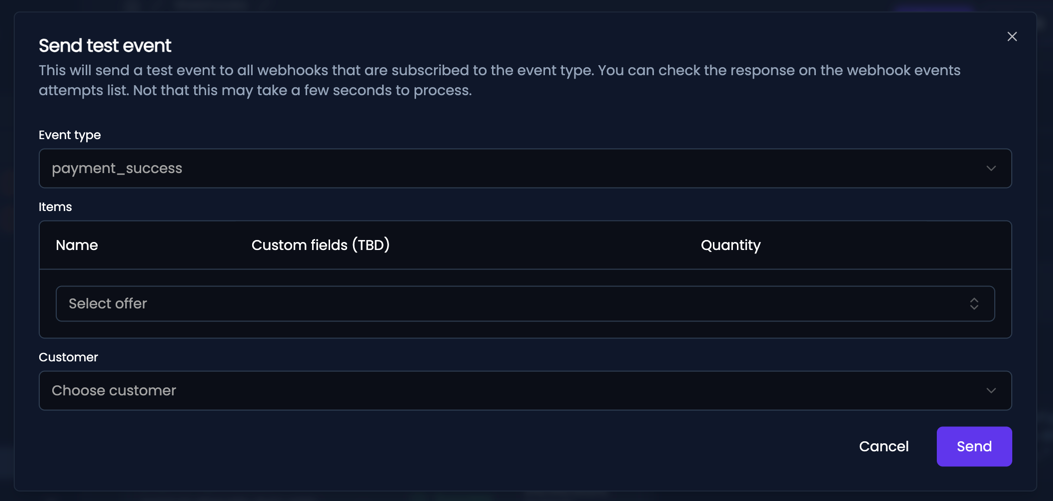
Inspect the payload
Check webhook.site to see the full event payload and headers.
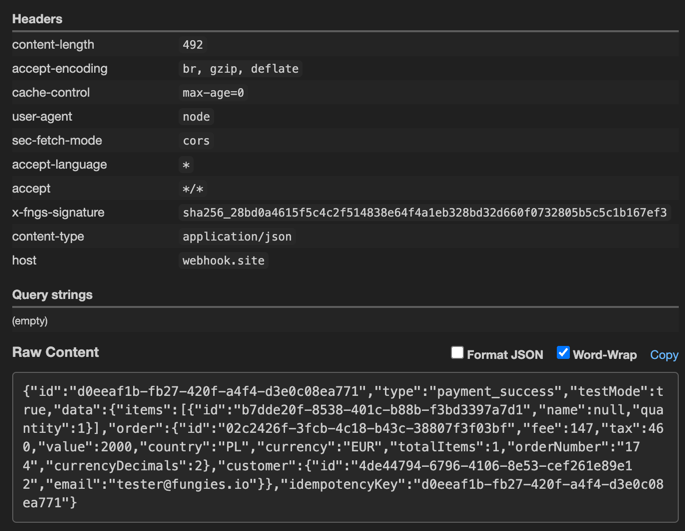
Test events include "testMode": true in the payload and don't affect any real data in your account.
Option 2: Test Your Code with ngrok
ngrok creates a secure tunnel from the internet to your local machine. This lets you test your actual webhook handler code with real Fungies events.
Install ngrok
# macOS (Homebrew)
brew install ngrok

# Or download from https://ngrok.com/download
Start the Tunnel
Run your local server, then create a tunnel to it:
# Start your local server (example: running on port 3000)
npm run dev

# In another terminal, create the tunnel
ngrok http 3000
You'll see output like this:
Session Status                online
Forwarding                    https://abc123.ngrok.io -> localhost:3000
Register Your Tunnel URL
- Copy the
https://...ngrok.ioURL - Go to Fungies Dashboard → Developers → Webhooks
- Create a webhook with your ngrok URL + your endpoint path (e.g.,
https://abc123.ngrok.io/webhooks/fungies)
Send Test Events
Use the Test button in the Dashboard to send events to your local server. Check your terminal logs to see the events being received and processed.
ngrok provides a local web interface at http://localhost:4040 where you can inspect all requests and replay them for debugging.
Testing Best Practices
Use a Separate Webhook for Testing
Create a dedicated webhook endpoint for development to avoid mixing test events with production data.
Verify Your Error Handling
Test how your handler responds to:
- Invalid payloads
- Missing required fields
- Duplicate events (same event ID sent twice)
- Network timeouts
Log Everything During Development
app.post('/webhooks/fungies', (req, res) => {
  console.log('Received webhook:', {
    headers: req.headers,
    body: JSON.stringify(req.body, null, 2)
  });

  // ... your handler logic

  res.status(200).send('OK');
});
Checklist Before Going Live
2xx within 25 secondsNext Steps
Last updated